Developers are sold expensive laptops on the assumption that writing code is computationally demanding. Mostly it is not. A text editor uses very little; the compiler runs in bursts; the browser is usually the heaviest thing on the machine.
What programming does demand is different: enough memory to run several things at once, a screen you can read for long periods, a keyboard you can type on for hours, and — depending on what you build — the ability to run containers, emulators or virtual machines without the machine grinding to a halt.
This guide covers what genuinely matters, ranked, with the Nigerian buying context that international advice omits.
What matters most
RAM, by a considerable margin
This is the specification that determines whether development is pleasant or miserable.
A typical working setup is an editor, a browser with many tabs, a terminal or two, a running development server, a database, and possibly a container or emulator. Each is modest; together they are not.
16GB is the realistic minimum for comfortable work. 32GB if you run virtual machines, Android emulators, several containers, or heavy IDEs.
8GB is workable for lighter work — front-end with a simple toolchain, scripting, learning — but you will hit the limit, and hitting it means constant swapping to disk and a machine that feels broken.
Check whether it is upgradeable. Soldered 8GB is a machine with a short useful life for this purpose.
The screen
You will look at it for many hours a day, and this is where developers under-spend.
Resolution and screen area matter because code is vertical and you want to see enough of it. Full HD is the minimum; higher is genuinely useful. A 14 or 15-inch screen at 1920×1080 or above is a sensible target.
Matte rather than glossy reduces eye strain from reflections.
Brightness matters for working in daylight.
An external monitor transforms development comfort and is frequently a better use of money than upgrading the laptop itself.
The keyboard
You type all day. A poor keyboard is a daily irritation and, over years, a genuine physical problem.
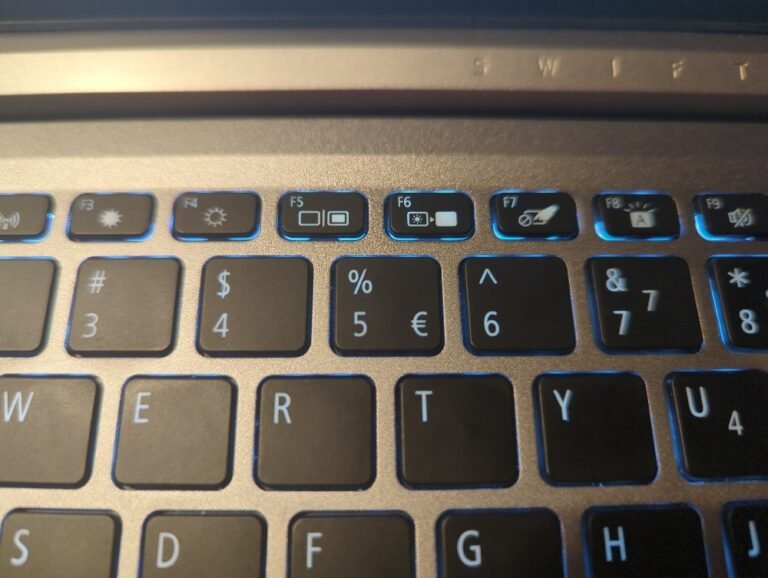
Key travel, layout, and whether the arrow keys and modifier keys are sensibly placed all matter. This cannot be assessed from a specification sheet — type on it before buying if at all possible. It is the strongest argument for buying in person.
Battery life
More important here than in most markets.
Where power is intermittent, a laptop that runs a genuine six to eight hours lets you keep working through an outage. One that manages three does not.
ARM-based machines — Apple’s M-series and the newer Windows ARM laptops — have a substantial advantage here, frequently delivering far longer real-world life than comparable x86 machines.
Storage
512GB minimum. Development consumes space quickly — toolchains, dependencies, container images, repositories, databases. 256GB becomes constraining faster than you expect.
Must be an SSD, and a fast one helps with compile times and dependency installation.
What matters less
Processor tier. A current mid-tier chip compiles most projects perfectly well. The exception is large codebases with long build times, where more cores genuinely help.
Discrete graphics, unless you do game development, machine learning locally, or graphics work. Otherwise it costs money, battery and heat for nothing.
Thinness. Very thin machines throttle under sustained load, which is precisely what a long compile is.
Platform considerations
macOS is popular among developers for the Unix-based terminal, good tooling support, and — with Apple Silicon — exceptional battery life and quiet operation. It is also mandatory for iOS development. The drawback in Nigeria is cost and repair availability.
Linux gives the most control and runs on almost anything, which makes it an excellent match for a refurbished business laptop. Free, and turns modest hardware into a capable development machine.
Windows with WSL has become a genuinely good development environment, giving a Linux toolchain alongside Windows. For most developers this is now perfectly viable, and it is the cheapest route to a capable setup.
The pragmatic Nigerian answer for most developers: a well-specified Windows machine with WSL, or a refurbished business laptop running Linux.
The refurbished route, seriously considered
Ex-corporate business laptops are frequently the best value for development work.
They were built for typing — the keyboards are usually excellent — they have matte screens, they are designed to be opened and upgraded, and parts are available. A three-year-old business machine with 16GB of RAM and an SSD costs less than a new consumer laptop with 8GB soldered.
Check: battery health, RAM capacity and free slots, storage type, processor generation, hinge condition, and every port.
For a student learning to code, or a developer building a first professional setup, this is usually the most machine per naira available.
The Nigerian context
Power. Battery life, a surge protector, and ideally a UPS for any desktop setup. Voltage fluctuation is a real threat to chargers and machines.
Heat and dust. Sustained compiles generate heat; clogged vents cause throttling. Clean them.
Warranty location. Confirm where it is honoured before buying.
Internet for dependencies. Development involves downloading a great deal — packages, images, toolchains. Where data is metered, this is a genuine cost. Cache aggressively, use offline documentation where you can, and do heavy setup work on Wi-Fi.
Counterfeit chargers are a real hazard. Use a reputable one.
A sensible configuration
For most developers in Nigeria, the target is:
16GB RAM, upgradeable if possible
512GB SSD
Current mid-tier processor
Full HD or better matte screen, 14 inch or larger
A keyboard you have actually typed on
Genuine six-hour-plus battery life
Local warranty coverage
Add an external monitor when you can. It improves daily comfort more than any component upgrade.
The short version
RAM first, screen second, keyboard third, battery fourth. Processor tier matters less than any of them for most development work.
16GB is the practical minimum and 32GB if you run emulators or virtual machines. Check whether it is soldered before you buy, because that determines how long the machine remains useful.
Windows with WSL is a perfectly good environment and the cheapest route to a capable setup. A refurbished business laptop running Linux is frequently the best value of all.
And weight battery life heavily — being able to keep working through an outage is worth more than a faster processor you will rarely saturate.
Sources and verification
We checked the practical guidance on this page against the primary or authoritative references below. Follow the linked source for the latest official position before making a payment or time-sensitive decision.
Laptop specifications are designed to confuse. Here is what actually determines whether a laptop feels fast and lasts, and how to choose one in Nigeria without overpaying.
Budget laptops are where the worst buying mistakes happen. Here is what to insist on, what to accept, and why refurbished business machines often beat new ones.
Video editing is one of the few tasks that genuinely needs a powerful laptop. Here is what actually matters, in order, and where the money is best spent.